 MiniMax H3 video generation
H3's data, 31% smaller. Every frame identical.
A single 10-second H3 clip pushes tens of gigabytes of internal data per denoising step between GPUs, caches and CPU memory. weights.zip stores and moves that data in 0.69 of its size, bit for bit, so every frame comes out exactly as it would without it.
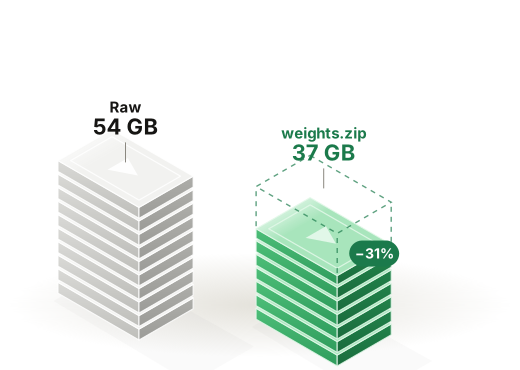
Tens of gigabytes per step, a third lighter.
Video models move far more internal data than text models. For one 10-second clip at 960×544 (37,626 tokens through 50 blocks), every denoising step produces the data below. weights.zip cuts all of it to about 0.69 of its size, and restores it bit for bit wherever it is read.
Attention data per step
All 50 layers, one 10 s clip at 960×544Block inputs per step
All 50 blocks, what step caches and offload keep| Data | Raw | weights.zip |
|---|---|---|
| Attention K/V, one layer | 1.08 GB | 0.74 GB |
| Attention K/V, all 50 layers | 54 GB | 37 GB |
| Block inputs, all 50 blocks | 20 GB | 14 GB |
Sizes come from H3's real tensor shapes at 37,626 tokens and 50 blocks. The 0.69 ratio is measured and bit-exact: every value is restored exactly.
Anywhere H3's data is stored or moved.
Faster multi-GPU generation on PCIe GPUs
Long clips are split across GPUs that exchange attention data at every layer of every step: about 54 GB per step, cut to 37 GB. On L40S, RTX 6000 Ada and other cloud cards without NVLink, that exchange is often a large share of the time, so each clip could finish roughly 5 to 10% faster.
Bigger step-to-step caches
Providers skip work by reusing results between denoising steps (TeaCache and FBCache-style caching). The same memory holds about 1.45× more cached data, saving 6 GB per cached step at this size, so caching now fits at 960×544 and 10-second clips where memory ruled it out before. The output does not change.
H3 on smaller, cheaper GPUs
Offloading to CPU memory to fit H3 on 24 to 48 GB cards? PCIe traffic drops by 31%. The codec keeps up easily, running at about 25 to 64 GB/s even on a busy consumer GPU, far faster than the PCIe link it feeds.
Fine-tuning and LoRA training
Saved activations take a third less memory, so you can train on longer clips or larger batches on the GPUs you already have.
Live and streaming generation
In generate-the-next-10-seconds-while-playing setups that carry context forward, that context is about 31% smaller to store and hand off between GPUs.
Why providers choose it
- Zero quality risk. Frames are bit-identical, so there is no visual review, no A/B test and no sign-off per model.
- No per-model tuning. The same codec that runs on DeepSeek ran on H3 unchanged.
- A clear lead over free tools. zstd at its highest setting reaches only 0.79 on H3's data, against 0.69 for weights.zip.
- No retraining and no changes to the model weights.
Good fit when
- You split long H3 clips across several GPUs, especially over PCIe.
- You cache between denoising steps and memory caps the cache.
- You offload to CPU memory to run H3 on 24 to 48 GB cards.
- You fine-tune or train LoRAs on H3.
Up to $10M a year on a $100M H3 fleet.
Estimated saving per year, up to
$100M a year of H3 GPU spend| Fleet | Where the saving comes from | Per year |
|---|---|---|
| PCIe GPUs, multi-GPU clips | Faster clips from less GPU-to-GPU traffic | $5M to $10M |
| NVLink GPUs with step caching | Larger caches, more steps skipped | $2M to $5M |
| NVLink GPUs, no caching or offload | Storage and transfer only | $0 to $1M |
Estimates, not measurements: the size result is measured, and the savings depend on how much of your generation time is spent moving or caching H3's data. A free benchmark measures it on your own setup.
No retraining. No changes to the model.
- Wrap the transfers and cachesData is compressed where H3 stores or sends it and restored bit for bit where it is read. The model and its weights are untouched.
- Keep your pipelineMulti-GPU splits, step caches and offload work as before, with a third less data in each.
- Pilot on your clipsWe measure time per clip, memory and cache capacity on your resolutions, lengths and GPUs.
Free benchmark on your models and traffic.
- Tell us your stackThe models you serve, your context lengths and your serving engine.
- Get your numbersMemory saved, quality against your current format and capacity per GPU, measured on your prompts.
- PilotRun on one workload for 30 days. Pricing is a share of the measured saving.
Built for the models you serve.
Model names and logos are trademarks of their owners and are used only to identify the models tested. weights.zip is not affiliated with or endorsed by DeepSeek, NVIDIA, Z.ai, Meta or MiniMax.